Open the unified inbox
Select Inbox in the sidebar. Use the social channels column (All platforms or a single account) to filter comments and messages from every connected network in one feed.
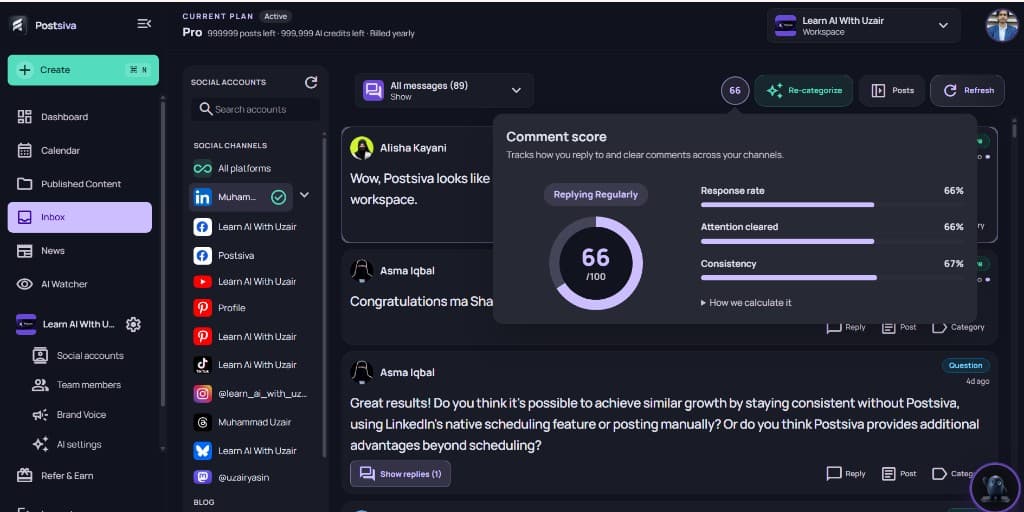
Comment score
Comment score tracks how you reply to and clear comments across channels (response rate, attention cleared, consistency). Use it as a quick health check before bulk-replying.
Generate replies with AI in one go
Filter to Unreplied (or a similar view). Under Bulk replies, select Generate for all to fill each open reply box with AI. Edit any row that needs a personal touch.
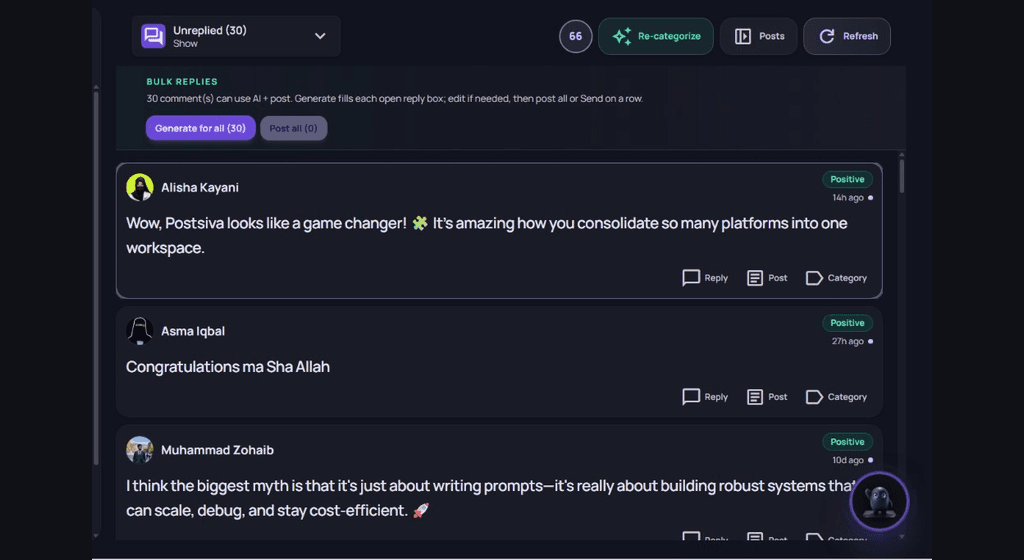
Generate for all uses AI credits. Review replies before you post — AI drafts should match your brand voice.
Post all with one click
- 1
Generate for all
Select Generate for all (N) so every eligible unreplied comment gets a draft reply in its box.
- 2
Edit if needed
Skim the list. Change any reply, or use Reply / Category on a single row.
- 3
Post all
When drafts look good, select Post all to publish replies in one click. You can also Post on a single row if you only want to send a few.
Post all stays unavailable (0) until generated replies are ready. Refresh the feed after posting to confirm unreplied counts drop.