Open the AI Toolkit
In Create post, select AI assistant. The AI Toolkit panel opens beside the composer (Digital Architect). Keep Live preview on so you can see generated text and media as you work.
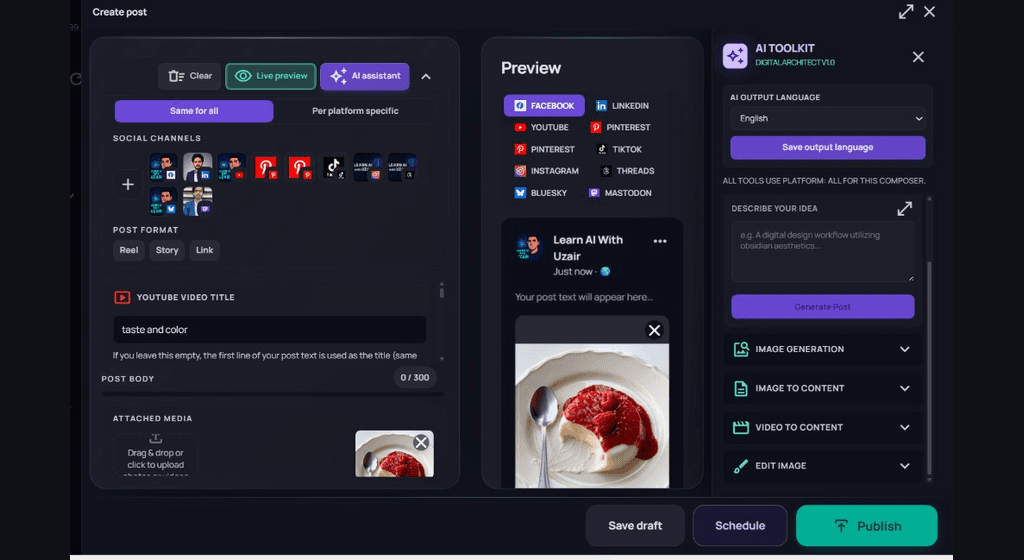
Generate a post from an idea
- 1
Set output language
Choose the AI output language (for example English), then Save output language if you change it.
- 2
Describe your idea
Write a short prompt in Describe your idea — topic, tone, and any details you want in the caption.
- 3
Generate Post
Select Generate Post. Review the result in the post body and preview, then edit before Save draft, Schedule, or Publish.
Other toolkit tools
- Image generation — create visuals from a prompt.
- Image to content — turn an attached or selected image into caption ideas.
- Video to content — generate copy from video context when available.
- Edit image — adjust an image before it stays on the draft.
AI uses workspace AI credits. Start with a draft you can review — do not publish generated content without checking channel limits and brand voice.